
Stripe metered billing is the system Stripe uses to track, aggregate, and invoice customers based on actual consumption through the Billing Meters API. As of 2025, the Billing Meters API replaced the legacy Usage Records API and is now the mandatory standard for usage-based pricing on Stripe. The core objects you work with are Meter, MeterEvent, Price (linked to a Meter), Customer, and Subscription. Get these right, and your billing is accurate. Get them wrong, and you're chasing ghost charges at 2 AM.
What are Stripe Billing Meters, and how do they work?
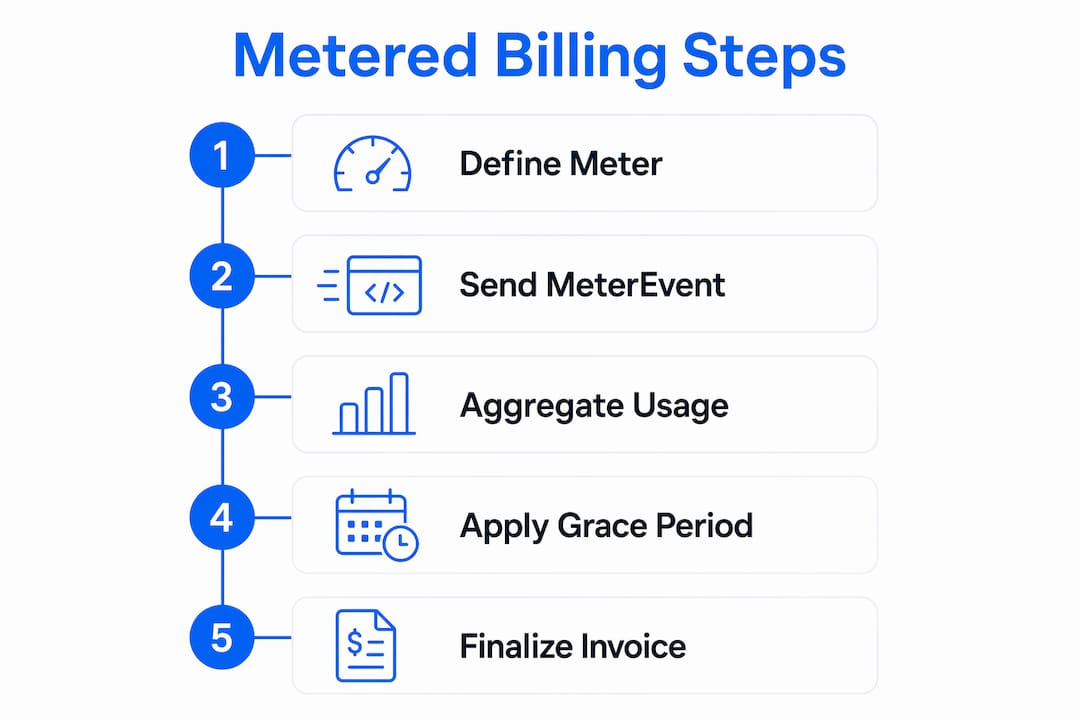
A Meter object defines what you track and how Stripe counts it. You specify an event name (for example, ai_tokens_used) and an aggregation method. Stripe currently supports two aggregation formulas: sum and last. The sum formula totals all reported values in a billing period. The last formula takes the most recent value, which works well for seat counts or storage snapshots.
MeterEvents are the individual data points you send to Stripe. Each event carries a customer ID, the event name matching your Meter, and a numeric value. Stripe appends these events to a running log and aggregates them automatically at the end of the billing period for invoicing. You never manually calculate totals.

One detail that saves teams from billing disputes: Stripe applies a one-hour grace period before finalizing an invoice. This window catches late-arriving usage events that were processed just after midnight on a billing cycle boundary. Without this buffer, any usage reported in that gap would simply vanish from the invoice.
Pro Tip: Set up a test Meter with a low unit price and run a full billing cycle in Stripe's test mode before touching production. You'll catch aggregation surprises before they cost you real money.
Key concepts to keep straight:
- Meter: defines the event name and aggregation formula
- MeterEvent: a single reported usage instance tied to a customer
- Price: a recurring Stripe Price object linked to a specific Meter
- Subscription: connects the Customer to the Price and activates billing
- Grace period: one hour after period end before invoice finalization
How to implement Stripe metered billing step by step
The API dependency chain is strict. Skipping or reordering any step causes systemic failures. Follow this sequence exactly:
- Create the Meter. Call
stripe.billing.meters.create()with your event name and aggregation type. Store the Meter ID. - Create the Product. A standard
stripe.products.create()call. Nothing unusual here. - Create the Price. This Price must reference your Meter ID in the
recurring.meterfield. Without this link, Stripe has no way to connect reported events to a billable line item. - Create the Customer. Use
stripe.customers.create()and store the Customer ID. This ID goes into every MeterEvent payload. - Create the Subscription. Attach the Customer to the Price. Store the resulting
subscriptionItem.id. You'll need it for usage queries.
Reporting usage is a single API call: stripe.billing.meterEvents.create(). Pass the event name, the customer ID, and the numeric value. That's it.
The part developers skip and regret: always pass an idempotencyKey with every MeterEvent. Meter events are append-only and cannot be deleted. A network timeout that triggers a retry without an idempotency key creates a duplicate event. Stripe will bill for both. The only fix is issuing a corrective negative event or a credit note, which is a painful conversation to have with a customer.
Report usage after a billable event completes successfully. If your AI inference call fails, don't report tokens. If you report first and the call fails, you've billed for nothing delivered.
Pro Tip: Store the subscription item ID in your database at subscription creation time. Plan changes generate a new subscription item ID, and if you're still reporting to the old one, usage disappears silently.
How does the new Billing Meters API differ from legacy usage records?
The legacy Usage Records API was deprecated in 2025. The /v1/subscription_items/{id}/usage_records endpoint and the aggregate_usage parameter on Price objects are both gone. If your codebase still calls stripe.subscriptionItems.createUsageRecord(), it is using a removed endpoint that will return errors.
The architectural difference matters. The old system tied usage records directly to a subscription item. The new system separates concerns: Meters exist independently of subscriptions, and MeterEvents reference customers rather than subscription items. This separation means you can record usage before a subscription even exists, which is useful for trial periods or pre-billing flows.
| Feature | Legacy Usage Records | Billing Meters API |
|---|---|---|
| Endpoint | /usage_records on subscription item | stripe.billing.meterEvents.create() |
| Aggregation config | aggregate_usage on Price | Defined on the Meter object |
| Usage attachment | Subscription item | Customer ID |
| Pre-subscription recording | Not supported | Supported |
| Idempotency keys | Optional | Required for safe retries |
| Status | Deprecated (2025) | Current standard |
The new API also makes real-time usage reporting simpler. You fire a MeterEvent immediately after a billable action. Stripe handles the rest.
Best practices for usage reporting and customer visibility
Batching usage events is the right call at scale. Sending one API call per user action works fine at low volume, but it creates rate-limit exposure and failure cascades at high throughput. Collect events in memory or a queue, then flush them in batches every few seconds or minutes depending on your volume.
Building idempotent reporting systems from day one prevents billing drift. At high throughput, timing issues near the billing period boundary are common. A usage event that arrives one second after period close lands in the next invoice. Reconciliation logic that compares your internal usage logs against Stripe's aggregated totals catches these gaps before customers notice.
For customer-facing usage dashboards, use stripe.billing.meters.listEventSummaries(). This method fetches aggregated usage data for a given Meter and customer over a date range. Multiply the returned total by your unit price from the Price object to show an estimated cost. Customers who can see their usage in real time generate far fewer billing support tickets.
Additional practices worth building into your system:
- Webhook listeners: subscribe to
customer.subscription.updatedandinvoice.finalizedevents to sync billing state in your database - Negative events: when you need to correct an overbilled amount, issue a MeterEvent with a negative value to offset the error
- Credit notes: for larger corrections after an invoice is finalized, use Stripe credit notes rather than negative events
- Usage reconciliation: run a nightly job comparing your internal event log against
listEventSummariesoutput to catch any reporting gaps
One thing Stripe does not do: enforce feature access inside your application. Stripe aggregates and bills. Your app must check whether a customer has remaining quota before serving a request. These are two separate systems, and conflating them is a common source of production bugs.
Common pitfalls when working with Stripe metered billing
The most expensive mistake is sending the wrong customer ID in a MeterEvent payload. Stripe will accept the event without error, but the usage lands on the wrong customer's account. The correct customer gets undercharged. The wrong customer gets overcharged. Neither will be happy.
Stripe charges an additional 0.7% fee on usage-based billing beyond normal payment processing fees. For a $14 product, total fees approximate 3.7% when combined with standard processing. Factor this into your unit pricing before you launch, not after your first payout.
Watch for these specific failure modes:
- Wrong customer ID: usage goes to the wrong account with no error returned
- Missing idempotency key: retries create duplicate events that inflate the invoice
- Stale subscription item ID: plan changes generate new IDs; old IDs silently drop usage
- Reporting before event success: billing for failed API calls or incomplete actions
- Ignoring the grace period: usage reported just after period close lands in the next cycle, not the current one
Pro Tip: Log every MeterEvent you send, including the idempotency key, customer ID, value, and timestamp. This log is your ground truth for reconciliation and your first defense in any billing dispute.
The grace period is a safety net, not a strategy. Design your system to report usage promptly. Relying on the one-hour buffer for normal operations means you're one slow queue away from missing an invoice cycle entirely.
Key Takeaways
Stripe metered billing requires strict sequential object creation, idempotent event reporting, and application-level entitlement enforcement to function correctly in production.
| Point | Details |
|---|---|
| Strict creation order | Build Meter, Product, Price, Customer, and Subscription in sequence or the API fails. |
| Idempotency keys are required | Always pass an idempotency key with MeterEvents to prevent duplicate billing on retries. |
| Legacy API is gone | The Usage Records API was deprecated in 2025; migrate to stripe.billing.meterEvents.create() now. |
| Stripe does not enforce entitlements | Your app must check customer quota before serving requests; Stripe only aggregates and bills. |
| Factor in the 0.7% fee | Stripe's usage-based billing fee adds to standard processing costs; price your units accordingly. |
What I've learned from shipping Stripe metered billing in production
The sequential creation order is the part that bites teams hardest in the first week. I've seen engineers parallelize the Meter, Product, and Price creation calls to shave a few milliseconds off setup time, and then spend two days debugging why subscriptions fail to activate. The dependency chain is not a suggestion. It is a hard constraint.
Idempotency from day one is non-negotiable. The first time you see a customer invoice with doubled usage because a Lambda function retried a MeterEvent after a timeout, you will never skip the idempotency key again. Build the key generation into your event reporting utility at the start, not as a patch after the first incident.
The reconciliation piece is where most teams underinvest. Stripe handles aggregation correctly, but your reporting pipeline is not Stripe. Network failures, queue backlogs, and application bugs all create gaps between what your system thinks it reported and what Stripe actually received. A nightly reconciliation job that diffs your internal logs against listEventSummaries output is the difference between billing you trust and billing you hope is right.
One thing I tell every team I work with: build the usage dashboard for your customers before you launch. Customers who can see their usage in real time almost never dispute invoices. Customers who can't see usage dispute every invoice that surprises them.
Stripe's metered billing handles aggregation and invoicing. Your app handles feature access enforcement. Keep these responsibilities separate in your codebase, and you'll avoid a whole class of production bugs where billing state leaks into application logic.
— Kaggbac
Shipwrightkit handles Stripe metered billing out of the box
Building usage-based billing from scratch takes weeks of careful API work, reconciliation logic, and dashboard development. Shipwrightkit is an AI SaaS starter kit that ships with Stripe metered billing already wired in.

The kit supports hybrid pricing models that combine flat subscription fees with usage-based charges, which is the pricing structure most AI SaaS products need. Reconciliation hooks, webhook listeners, and customer usage dashboards are included. You get the full billing infrastructure on day one so your team can focus on the product itself. Check the Shipwrightkit homepage to see what ships out of the box, or review the pricing plans to find the right fit for your team.
FAQ
What is Stripe metered billing?
Stripe metered billing is a usage-based pricing system where customers are charged based on actual consumption tracked through the Billing Meters API. Meter objects define what is tracked, and MeterEvents report individual usage instances to Stripe.
Is the Stripe Usage Records API still available?
No. The Usage Records API was deprecated in 2025 and replaced by the Billing Meters API. Calls to stripe.subscriptionItems.createUsageRecord() will return errors in current integrations.
How do I report usage with the new Stripe API?
Call stripe.billing.meterEvents.create() with the event name, customer ID, and usage value. Always include an idempotency key to prevent duplicate billing on retries.
What happens if I send a MeterEvent with the wrong customer ID?
Stripe accepts the event without error, but the usage is attributed to the wrong customer. There is no automatic correction. You must issue a negative MeterEvent on the wrong account and a new event on the correct account.
Does Stripe enforce usage limits or feature access?
No. Stripe aggregates usage and generates invoices, but it does not block API calls or enforce quotas inside your application. Your app must check customer entitlements before serving any billable request.